In SharePoint 2007, there was one list customization I had to do more than any other. A stakeholder would have a custom list, with a user field, and they would more often then not, want some profile fields to display in the list. So that they could filter the items by those profile fields. Things like State, or Office Location.
What i eventually had to do in SharePoint 2007, was kind of hacky, and really annoying to implement. Say if the user wanted the Office to be displayed in each row, i would create the Office field in the list definition as a Person field. Then make an event receiver, that on ItemAdding, would update the Office field to be the same user in the normal Person field, but instead of displaying the Name, i would display the user profile field that the stakeholder wanted.
So with multiple columns, i would end up with something like this:
[image]
But with SharePoint 2010 this problem goes away. Enter list joins and projected fields. What this allows is having one list, and showing value from a joined list. Things did not go as smoothly as i hoped though.
So i went into the column create screens and cycled through the different field types. I was disappointed that the person field did not have what i wanted. Only the lookup field type had the projected fields. Well i could live with that, but it would not be the ideal solution. Because you would not be able to make use of the people picker, it would just be a very large dropdown.
But when i went to assign the lookup table to the hidden "User Information List", well, it was hidden. This list if you dont know, holds a copy of the user profile fields marked as replicatable. Sharepoint takes care of keeping it in sync with the values in the SSP or Application Service.
I suspected that while it was hidden, i could still make the join, just not through the interface. So i went hunting from some scripts, preferably powershell to create this projected fields. I found them on msdn, and it looked pretty straight forward. It got me thinking.
Hang on though, a person field is just a lookup field, so i could go back to my orignial plan of joining the custom list to the "User Information List", but using a Person field instead of a lookup.
To my shock, everything work out as i had hoped for since the start. Effectively i have reduced a days work of hassle and deployment, to a few lines of powershell.
Scripts and screen shots to come later.

2007-09-13
Enabled / Disable Network Adapter with Powershell
All i wanted to do was enable a network connection using powershell.
But unfortunately the easy way only works on Vista, and i needed it in Windows Server 2003. http://blogs.msdn.com/daiken/archive/2007/02/09/enable-disable-network-connection.aspx
I had to go digging around for how you used to have to enable the connection with wsf. http://mcpmag.com/columns/article.asp?EditorialsID=619
And then converted it into something i could use in powershell.
$shell = New-Object -comObject Shell.Application
((($shell.NameSpace(3).Items() | where {$_.Name -eq "Network Connections"}).GetFolder.Items() | where {$_.Name -eq "Local Area Connection"}).Verbs() | where {$_.Name -eq "En&able"}).DoIt()
And to disable.
$shell = New-Object -comObject Shell.Application
((($shell.NameSpace(3).Items() | where {$_.Name -eq "Network Connections"}).GetFolder.Items() | where {$_.Name -eq "Local Area Connection"}).Verbs() | where {$_.Name -eq "Disa&ble"}).DoIt()
At must have had at least 30 tabs open in my browser by the time i got this to work.
2006-12-19
Is DTS dead?
I was writting some scripts to move/copy databases for my releasing program for mssql 2000, but then couldnt find that many up-to-date resources. It seems there is a new tool for 2005 called SSIS.
http://msdn2.microsoft.com/en-us/library/ms141026.aspx
But i did find some links about how to create a basic DTS file, possibly that could be run from the command line.
http://www.15seconds.com/Issue/030909.htm
And then what files i would need on the running server
http://www.sqldts.com/default.aspx?225
http://msdn2.microsoft.com/en-us/library/ms141026.aspx
But i did find some links about how to create a basic DTS file, possibly that could be run from the command line.
http://www.15seconds.com/Issue/030909.htm
And then what files i would need on the running server
http://www.sqldts.com/default.aspx?225
Webservice Envelope Validation
How do you do that, this article explains.
I have got a extension that just logs soap packets, so its not too hard to plug the validator into that.
I have got a extension that just logs soap packets, so its not too hard to plug the validator into that.
ASP.NET 1.1 and 2.0 Working Together
Is this possible on a shared provider, i dont think so, but its good for self managed.
SVN Externals No Good
After much work using svn externals for internal class libraries i have come to the realisation that they should not be used for this.
http://www.brunningonline.net/simon/blog/archives/002031.html
http://svn.haxx.se/dev/archive-2003-07/1617.shtml
A few other people tend to agree, or have found the smae problems that i have.
Its just a nightmare to try and manage them.
I'm actually starting to think that no software configuration information should be stored in the svn repository and that should be maintain by an outside program.
http://www.brunningonline.net/simon/blog/archives/002031.html
http://svn.haxx.se/dev/archive-2003-07/1617.shtml
A few other people tend to agree, or have found the smae problems that i have.
Its just a nightmare to try and manage them.
I'm actually starting to think that no software configuration information should be stored in the svn repository and that should be maintain by an outside program.
More Automated Software Process
I have been using cc.net for a while and its great, but then when i want to do more things, like scripted releases / packages / branching, i dont have a complete tool.
There is maven and lunt build, but both are written in java. And i think they are more similar to cc.net then the linked tool.
If i can't find one written in .net, i might have to build one. A little bit of effort here saves both time and hassel in the future thats for sure.
There is maven and lunt build, but both are written in java. And i think they are more similar to cc.net then the linked tool.
If i can't find one written in .net, i might have to build one. A little bit of effort here saves both time and hassel in the future thats for sure.
Server backgrounds
You know how you can have the windows build number and OS version appear on your desktop with a reg setting, what do you do if you want more details. You use this tool, it is awesome on servers where you can then just look at the desktop to see what machine you have connected to. Especially when you are connected to more than one at a time.
SQL XML Not Required
I was under the impression that you had to have the sqlxml component installed to use the feature where xml is returned from a t-sql query. I was using the connection string like this:
var objConn = new ActiveXObject("ADODB.Connection");
//Provider=SQLXMLOLEDB.3.0;Data Provider=SQLOLEDB
var objComm = new ActiveXObject("ADODB.Command")
objComm.ActiveConnection = objConn
objComm.CommandText = tSQL
var objStream = new ActiveXObject("ADODB.Stream")
objStream.Open()
objComm.Properties("Output Stream") = objStream
objComm.Execute(null, null, 0x400)
objStream.Position = 0
This turns out not to be the case, you can use this as the connection string:
//Provider=SQLOLEDB;Data Provider=SQLOLEDB
And then you dont need to install the extra component, good for shared hosting!
var objConn = new ActiveXObject("ADODB.Connection");
//Provider=SQLXMLOLEDB.3.0;Data Provider=SQLOLEDB
var objComm = new ActiveXObject("ADODB.Command")
objComm.ActiveConnection = objConn
objComm.CommandText = tSQL
var objStream = new ActiveXObject("ADODB.Stream")
objStream.Open()
objComm.Properties("Output Stream") = objStream
objComm.Execute(null, null, 0x400)
objStream.Position = 0
This turns out not to be the case, you can use this as the connection string:
//Provider=SQLOLEDB;Data Provider=SQLOLEDB
And then you dont need to install the extra component, good for shared hosting!
Handling Nulls in Webservices
I think i will start using this blog to remember what i have learn and so i can always come back to it if i forget about it.
So this was where if nulls are passed into a .net 2.0 webservice, then the elements are removed from the soap envelope that is sent.
So this was where if nulls are passed into a .net 2.0 webservice, then the elements are removed from the soap envelope that is sent.
2006-10-08
Accessing Session in HttpApplication
This is an interesting thing, when trying to access the Session object in your global class like this:
public class global : System.Web.HttpApplication {
void Application_PreRequestHandlerExecute(object sender, EventArgs e) {
if(User.Identity.IsAuthenticated) {
if(Session != null) {
}
if(Context.Session != null) {
}
}
}
}
The first access to the Session throws this exception:
Session state is not available in this context.
But the second one succeeds, i assume that they would both be accessing the same underlying object. Weird.
2006-09-27
Spring.Net Schema
Its easy to get intellisense for your spring object files, as resources, by copying the spring-objects.xsd file into %ProgramFiles%\Microsoft Visual Studio 8\XML\Schemas.
2006-09-25
Mem Usage vs VM Size
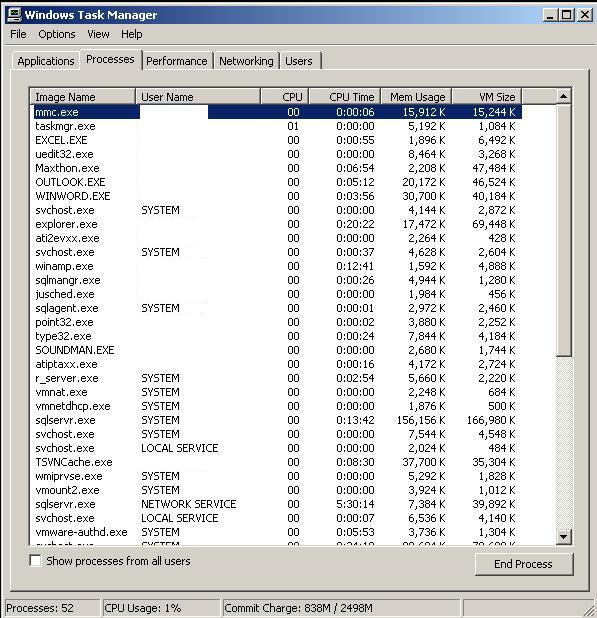 When viewing my task manager, I always make sure that the VM Size column is turned on. This shows the actual memory footprint that the process has, rather than what is currently taken. For instance, if you minimise an application, usually the Mem Usage column will drop, but the VM Size doesnt. Though it didnt matter with my memory leak program, both the numbers filled all my available ram.
Design Time Master Page
Robin provides a neat solution to design time masterpage pattern. Although Server.Transfer and Server.Redirect wont work, but that should be fixed in IIS 7.
GC.Collect not the solution
Many times i have come to situations where the memory usage in my program spirals out of control. Always i think it is a problem with anything but my program. I test the cleanups of the 3rd party libraries, and every other little thing. Then i resort to put GC.Collect statements around, thinky that it will magically free memory.
GC.Collect();
GC.WaitForPendingFinalizers();
GC.Collect();
Then i go searching for how to debug these things:
http://blogs.msdn.com/tess/archive/2006/09/06/742568.aspx
http://blogs.msdn.com/tess/archive/2006/08/11/695268.aspx
Finally i get stuck into reviewing my code with a fine tooth comb, and find one thing that was causing the leak, static array on a singleton, used in temporary processing, that didnt get cleared.
2006-09-23
HttpContext Items Strongly Typed
I have just refactored my nHibernate session store in HttpContext.Items to use this as the base class. This fits perfectly with the spring wiring and means that i can also use it in other projects, for other items that i want strongly typed access to the object. I forgot the dispose method so i was having bad memory leaks. See also the default(T) keyword, interesting.
So for instance, the thread store i use for unit testing will look like this:
And the HttpContext store will look like this:
public abstract class AbstractObjectCacher<T> {
#region IoC
private IObjectCache<T> cache;
public IObjectCache<T> Cache {
set { cache = value; }
get { return cache; }
}
        #endregion
        public T Get() {
return cache.Get();
}
public void Set(T obj) {
cache.Set(obj);
}
public void Dispose() {
T obj = Get();
if(obj != null) {
Set(default(T));
if(obj is IDisposable) {
((IDisposable)obj).Dispose();
}
obj = default(T);
}
cache.Clear();
}
}
So for instance, the thread store i use for unit testing will look like this:
public class ThreadObjectCache<T> : IObjectCache<T> {
#region IoC
private string key;
public string Key {
set {
key = value;
ThreadStore.Initialise(key);
}
get { return key; }
}
#endregion
public T Get() {
return (T)ThreadStore.Get(key);
}
public void Set(T obj) {
ThreadStore.Set(key, obj);
}
public void Clear() {
ThreadStore.Set(key, null);
}
public void Dispose() {
ThreadStore.Dispose(key);
}
}
And the HttpContext store will look like this:
public class HttpContextCache<T> : IObjectCache<T> {
#region IoC
private string key;
public string Key {
set { key = value; }
get { return key; }
}
#endregion
public T Get() {
return (T)HttpContext.Current.Items[key];
}
public void Set(T obj) {
HttpContext.Current.Items[key] = obj;
}
public void Clear() {
HttpContext.Current.Items[key] = null;
}
public void Dispose() {
HttpContext.Current.Items.Remove(key);
}
}
2006-09-20
Changes are not allowed while code is running
How often have you got this message when you try to edit your source while debugging? "Changes are not allowed while code is running"

Notice the lock icon next to the filename, showing its read only.
This is a feature of VS that allows you to change the code and continue running with the modified code.
It seems to be only useful for desktop applications, not web apps that we develop.
We know that if we change code in the binary then we will need to recompile anyway, so how do we turn off this annoying message.
To remove the message, turn off Edit and Continue by:
Going to options

Go to Debugging, Edit and Continue and uncheck the top box

By turning off Edit and Continue, you still can create and remove debug points why the process is paused.
And you can still edit aspx’s, ascx’s, and their code besides (in the web application) without problems.

Notice the lock icon next to the filename, showing its read only.
This is a feature of VS that allows you to change the code and continue running with the modified code.
It seems to be only useful for desktop applications, not web apps that we develop.
We know that if we change code in the binary then we will need to recompile anyway, so how do we turn off this annoying message.
To remove the message, turn off Edit and Continue by:
Going to options
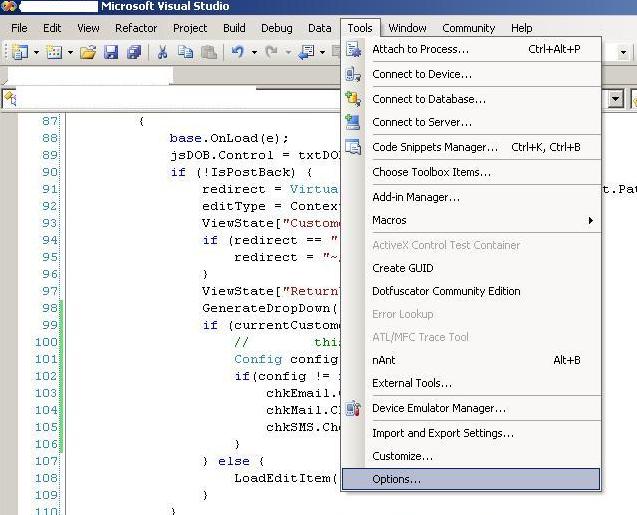
Go to Debugging, Edit and Continue and uncheck the top box

By turning off Edit and Continue, you still can create and remove debug points why the process is paused.
And you can still edit aspx’s, ascx’s, and their code besides (in the web application) without problems.
db4o 5.7
A new developement release of db4o has been released, which is supposed to be much faster than the previous versions. 5.7 is a couple of releases ahead of my current version 5.4.8 and the object browser has been updated too. This weekend if i get a chance i will work on intergrating this into the repository wrapper.
2006-09-19
Updating Atlas
After updating the AtlasControlToolkit to the latest version 1.0.60914.0, i ran into a bunch of problems. The first was the removal of the third AtlasControlExtenderer binary, whichwas easy to fix, just had to update references to the AtlasControlToolkit and namespaces.
The other issue i had was i was gettting a debugger alert client side about
PageRequestManagerID not being an attribute on draggablelistitem. This is a custom drag item i have implemented, so i just went digging through AtlasControlToolkit and found something similar to what i wanted to do DragPanelProperties and it has go this code:
So i just copied that into mine, and things worked. Its weird that there is no need to have the "new" keyword on this method. And why didnt it work in the first place.
The other issue i had was i was gettting a debugger alert client side about
PageRequestManagerID not being an attribute on draggablelistitem. This is a custom drag item i have implemented, so i just went digging through AtlasControlToolkit and found something similar to what i wanted to do DragPanelProperties and it has go this code:
[EditorBrowsable(EditorBrowsableState.Never),
Browsable(false),
DesignerSerializationVisibility(DesignerSerializationVisibility.Hidden)]
public string PageRequestManagerID {
get { return null; }
set { throw new NotImplementedException(); }
}
So i just copied that into mine, and things worked. Its weird that there is no need to have the "new" keyword on this method. And why didnt it work in the first place.
Subscribe to:
Posts (Atom)